You can easily monitor customers and suppliers from your accounts software using the one-click search facility. When you monitor a customer or supplier this way, Credit Guardian creates a link between the data in your accounting system and the credit report information from Experian. The information is combined to give you a better understanding of your customers/suppliers trading and risk position. This link is also used by the dashboards to build up the charts which gives you a unique insight into your trading status.
Importing customers and suppliers is the easiest way to monitor companies from your accounts.
To monitor companies from your accounts follow these steps:
- From the start page click Monitor companies from your accounts or from the sidebar
 Import Accounts. The Import Accounts window will appear.
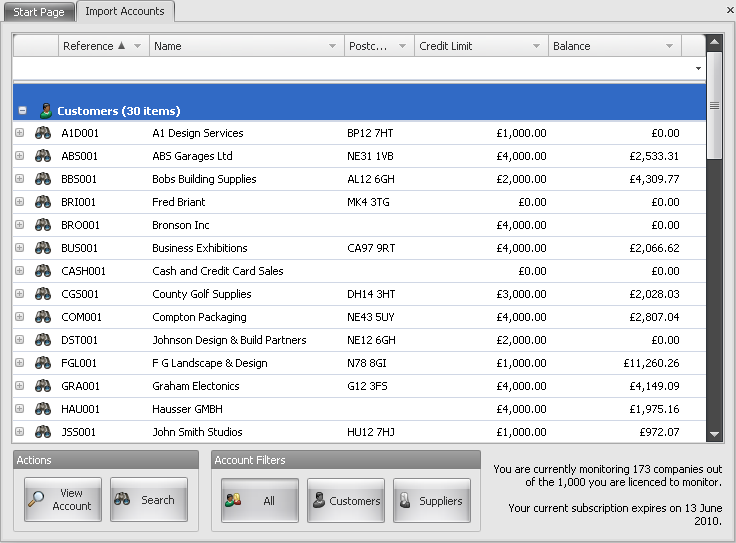
- Scroll down the list until you find the customer or supplier company you are looking for. Note: you can filter the list by clicking the in the blank area just below the name of the column and begin typing. You can also filter the list by select the account filters at the bottom of the window.
- Click the binocular button beside the company you want to monitor. This will start a search process with Experain which is indicated by a small animation. You can perform up to 5 simultaneous searches. You can also highlight the entire line and click the Search button to begin the search process.
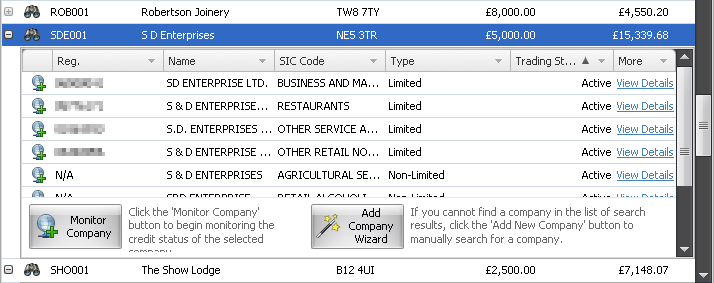
- If successful, a list of available companies that match your customer or supplier search will be return by Experian.
- Carefully check the list of returned companies for the one that matches your customer or supplier and highlight it.
- With the correct company highlighted click the Monitor Company button.
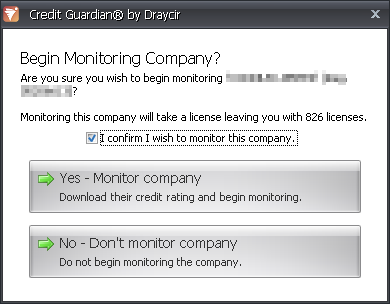
- A dialog box will appear asking you to confirm that you want to monitor this company. Monitoring a company will use one of your subscription licences. You will not be able to reuse the licence until your subscription expires and you renew it.
- Click Yes - Monitor company to begin monitoring the company.
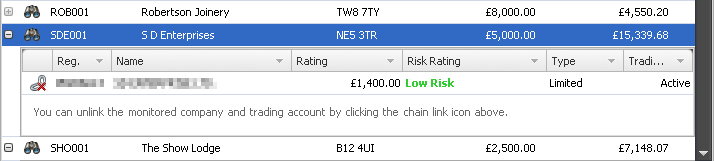
- Information on the company will be downloaded from the Draycir Credit Guardian server and saved to your local Credit Guardian database. A link will also be created between the downloaded company and the customer or supplier company within your accounts system.
- You can view the downloaded company information by highlighting the company and clicking the View Account button and selecting the Credit Risk tab.


