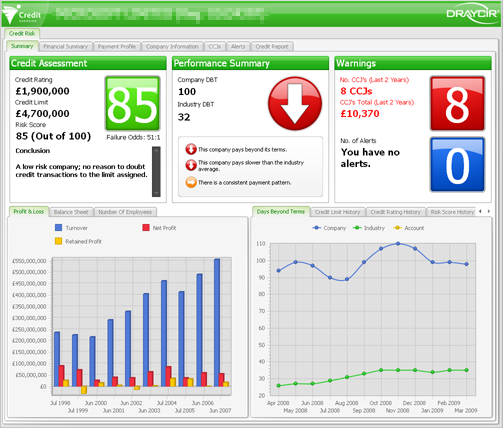
The Summary tab give a top level view of the company. This screen is designed to give a quick at-a-glance view of a company's status. This screen is divided into 5 different areas:
The following sections describe each area in detail.
|
Name |
Description |
|
Credit assessment gives you an indication of the companies credit worthiness. All of the information in this panel has been calculated by Experian. | |
|
This panel is a brief summary of the Payment Profile tab and displays how well this company pays its suppliers. Payment performance is a very powerful feature of Credit Guardian, for more information see What is Payment Performance and why is it important. The term DBT means Days Beyond Terms; in other words how many days late (beyond the terms agreed) does this company pay its suppliers?. For example, if this value is 0 it means the company pays its suppliers on time (within its terms). If this value is 56, it means it pays its suppliers 56 days... more | |
|
The warnings area displays basic information on County Court Judgements (CCJ's) and alerts that have been received on the company. A Country Court Judgement is where someone the company owes money too has filed an action at the court stating the company owes them an amount of money. More information can be found on the CCJs tab and the Alerts tab. | |
|
There are two information panels located at the bottom on the screen. This first panel contains quick access financial information from the Financial Summary tab while the second panel contains payment information, history and notes. |
|
Copyright (c) 2007 - 2010 Draycir Limited. All rights reserved.
|
|
What do you think about this topic? Send feedback!
|


 Group
Group